6 分類の読み方
本ツールは DMARC 集約レポートの各行を 6 つのラベルのいずれかに自動分類します。判定はルールベース(決定論)で行われ、同じ入力に対して常に同じ結果を返します。AI 推論やクラウド解析は使用しません。
判定に使用する情報
- SPF 認証結果(pass / fail / softfail / none)
- DKIM 認証結果(pass / fail / none)
- 送信元 IP アドレス(自社/外部の判別)
- ヘッダ From ドメインと Envelope From ドメインの一致
- 関連バウンスメールの有無(取り込み済みの場合)
6 ラベル一覧
| ラベル | 条件の概要 | 優先度 | 推奨アクション |
|---|---|---|---|
| なりすまし疑い | SPF / DKIM 両方 fail、送信元 IP が自社管理外。From ドメインは自社。 | 高 | 送信元 IP と ASN を確認し、なりすまし送信の可能性を調査。必要なら DMARC ポリシーを p=reject へ強化。 |
| 設定不備 | 送信元 IP は自社/正規 SaaS だが、SPF または DKIM が fail。 | 中 | SPF レコード(include: / ip4:)や DKIM セレクタの設定漏れを確認。SaaS 側の DKIM 署名設定の抜けが多い。 |
| 転送由来 | SPF fail / DKIM pass、または転送に特徴的な中継 IP を経由。 | 低 | 通常は対応不要。DKIM が通っていれば DMARC としては合格扱い。件数が異常に多い場合のみ確認。 |
| 正常送信 | SPF / DKIM のいずれかが pass かつ DMARC 整合(aligned)。 | - | 対応不要。記録としてトレンド確認のみ。 |
| バウンス | 取り込んだバウンスメールと突合できた fail エントリ。 | 中 | 宛先不達の原因(存在しないアドレス / 受信側の拒否)を確認。大量の場合は送信リスト衛生を見直す。 |
| 判定不能 | 情報不足(IP 逆引きできない、DKIM セレクタ不明など)で自動判定不可。 | - | 分類対象の件数が多い場合、レポート元プロバイダの仕様を確認。通常は放置してよい。 |
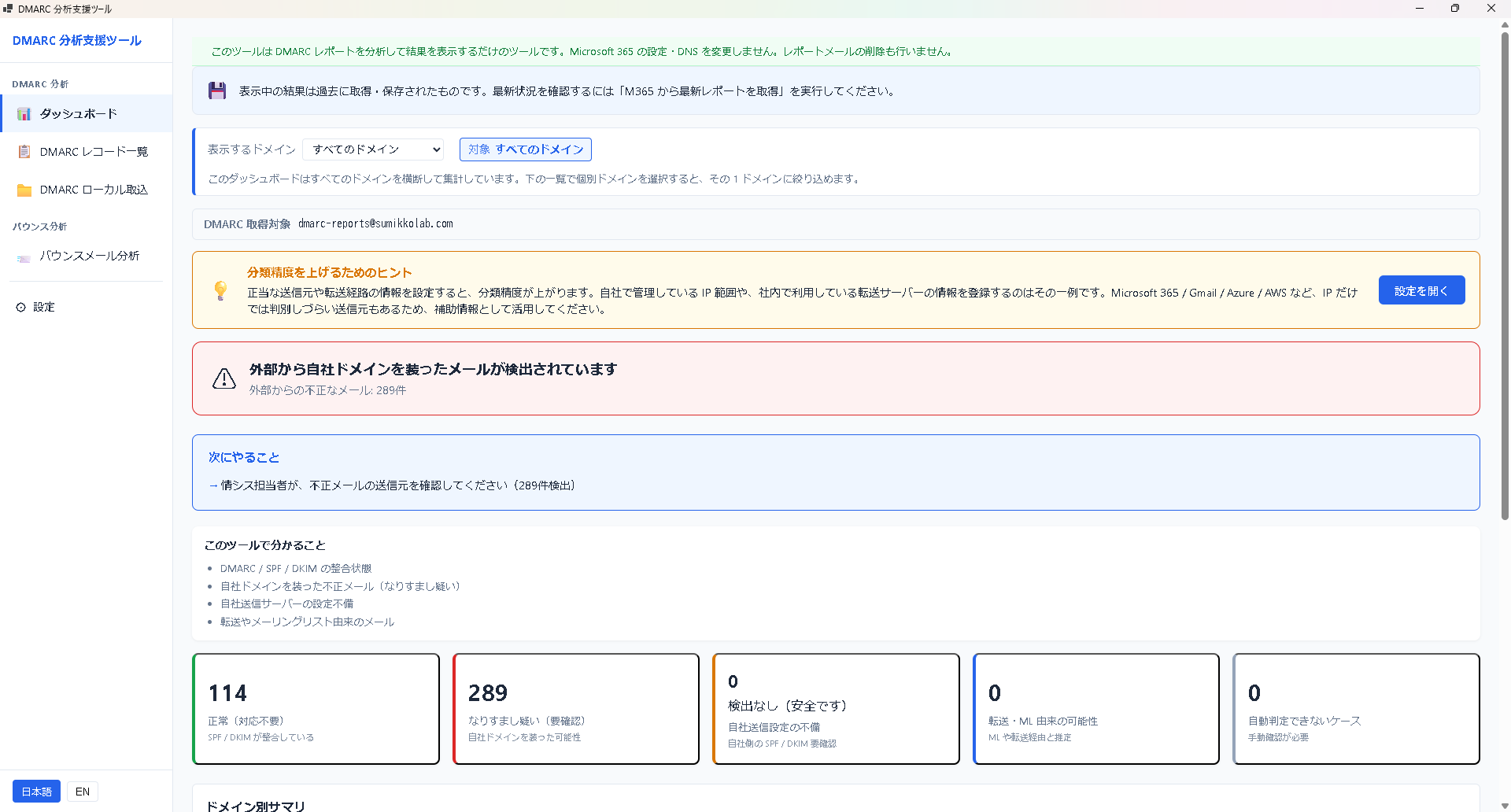
ラベルが示すもの・示さないもの
示すもの: そのエントリがどのカテゴリに該当するかの客観的な判定結果。
示さないもの: 実際の被害有無、攻撃者の意図、証拠としての法的効力。分類結果はあくまで 一次トリアージ のための目安です。最終的な対応判断は利用者の責任で行ってください。
判定が直感と違うとき
- 自社送信なのに「なりすまし疑い」: SPF / DKIM が未設定 or 間違っている可能性。「設定不備」に寄せるため SPF / DKIM を整備する。
- 明らかに転送なのに「設定不備」: 中継 IP のパターンが本ツールの既知リストにない場合。件数が多ければ report@ に情報提供を歓迎します。
- バウンスが取り込めていない: バウンスメールのフォルダ指定を確認。件名や送信者が標準的でないバウンスは未対応。
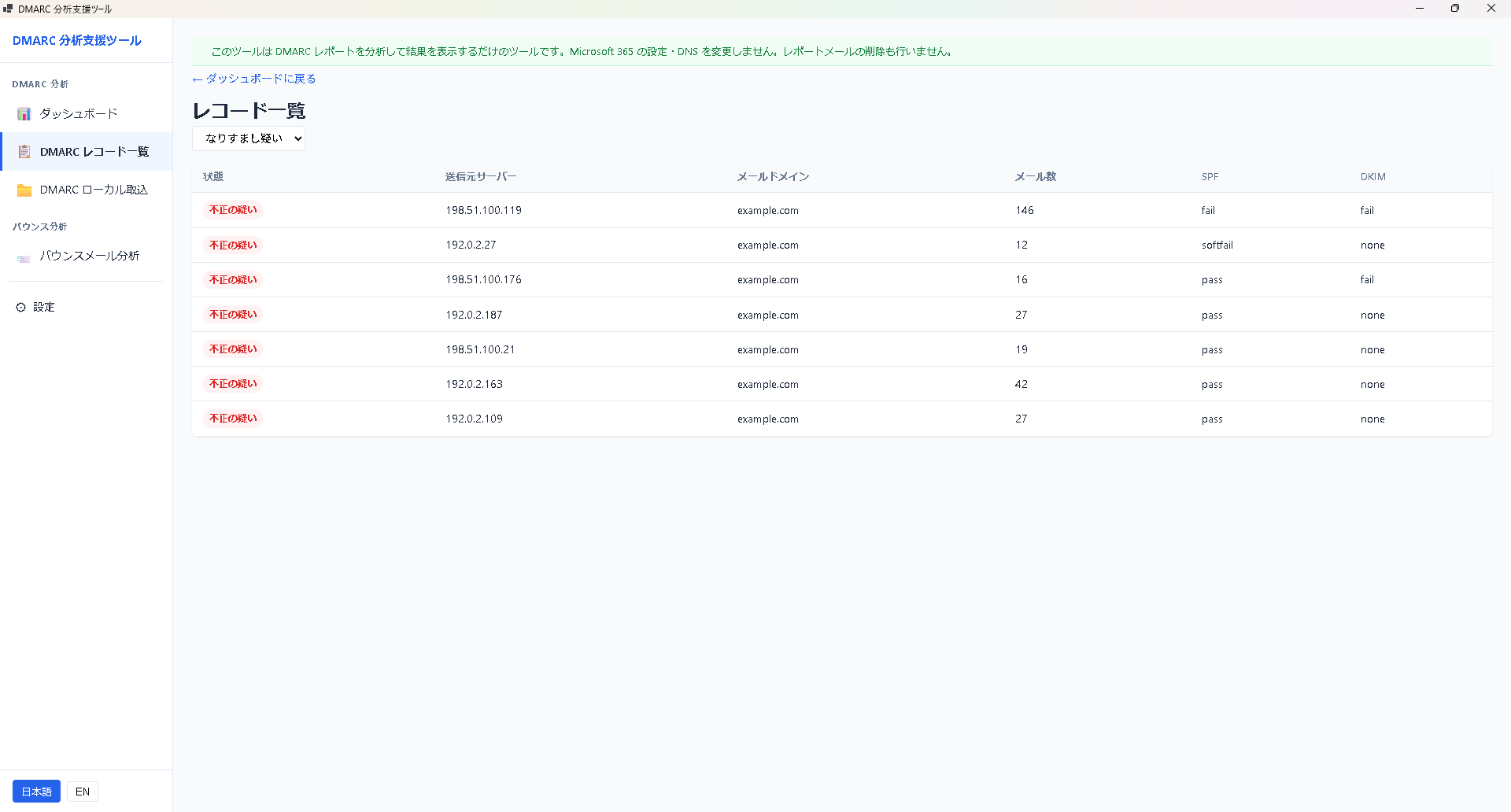
次にやること
- 第 7 章 トラブルシューティング: 取込・起動時の問題
- サポート・FAQ: よくある質問
Reading the Six Categories
This tool classifies each row of a DMARC aggregate report into one of six labels. Classification is rule-based (deterministic): the same input always produces the same output. No AI inference or cloud analysis is used.
Inputs used for classification
- SPF result (pass / fail / softfail / none)
- DKIM result (pass / fail / none)
- Source IP address (whether it belongs to your org or not)
- Alignment between header-From and envelope-From domains
- Whether a correlated bounce message exists (if imported)
The six labels
| Label | Condition | Priority | Recommended action |
|---|---|---|---|
| Spoofing suspected | Both SPF and DKIM fail; source IP is outside your org; From domain is yours. | High | Review source IP and ASN; investigate possible spoofing. Consider tightening DMARC to p=reject if appropriate. |
| Config issue | Source IP belongs to your org or a known SaaS, but SPF or DKIM fails. | Medium | Check SPF record (include: / ip4:) and DKIM selector configuration. Missing SaaS-side DKIM signing is common. |
| Forwarded | SPF fail with DKIM pass, or a forwarding-typical relay IP. | Low | Usually no action. If DKIM passes, DMARC overall passes. Investigate only if counts are abnormally high. |
| Legitimate | SPF or DKIM passes and is DMARC-aligned. | - | No action. Keep for trend tracking. |
| Bounce | Failing entries correlated with imported bounce messages. | Medium | Investigate bounce causes (nonexistent address, recipient rejection). Review list hygiene if high volume. |
| Unknown | Insufficient information (reverse DNS unavailable, unknown DKIM selector, etc.). | - | Generally leave alone. If counts are large, check whether the report provider uses a nonstandard format. |
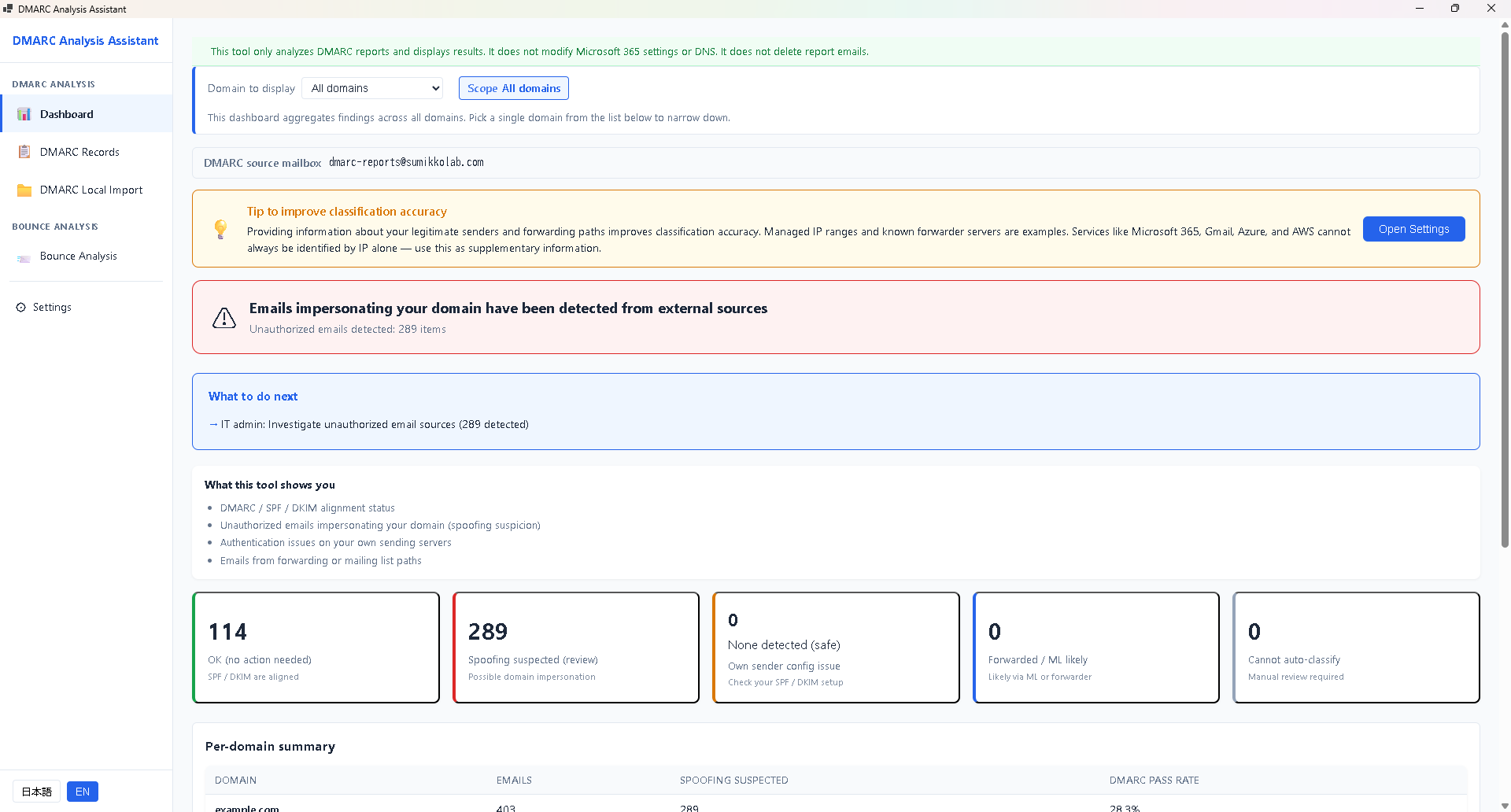
What the labels do and do not indicate
Do: Provide an objective category based on the observable data in the report.
Do not: Confirm actual harm, attacker intent, or legal-grade evidence. Classification is a first-pass triage aid. Final response decisions are your responsibility.
When the result feels wrong
- Your own traffic marked "Spoofing suspected": SPF/DKIM likely missing or misconfigured. Fix them, and the classification moves to "Config issue" or "Legitimate".
- Obvious forwards marked "Config issue": The relay IP may not match our known-forwarder heuristics. High-volume examples are welcome at support.
- Bounces not being correlated: Check that the bounce folder is specified. Non-standard bounce subjects/senders may be unsupported.
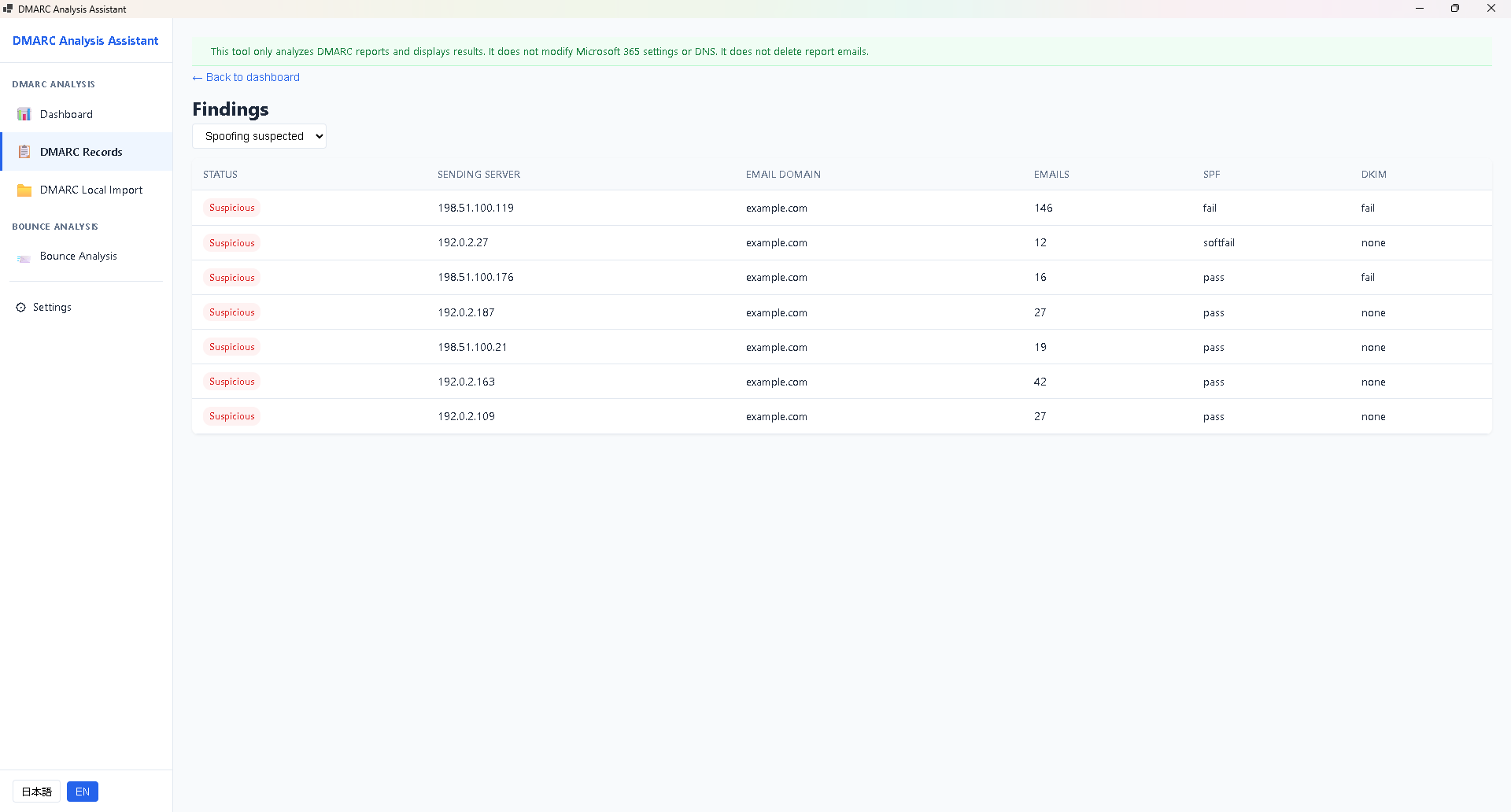
Next steps
- Chapter 8 Troubleshooting: import and launch issues
- Support & FAQ